


Bmedical Background 524019358

GENEActiv – Actigraphy

Group 792@2x 1

News

ActivInsights has launched their new software to better support their GeneActiv actigraphy devices. The ActivInsights Sleep Toolkit is designed to provide clinicians with simple sleep scoring for an AWD file.

Read more about the software update here, and contact our team for a device trial or training at [email protected] 

View a SAMPLE REPORT

About

GENEActiv – Raw Data Actigraphy for Sleep, Activity, and Lifestyle Monitoring

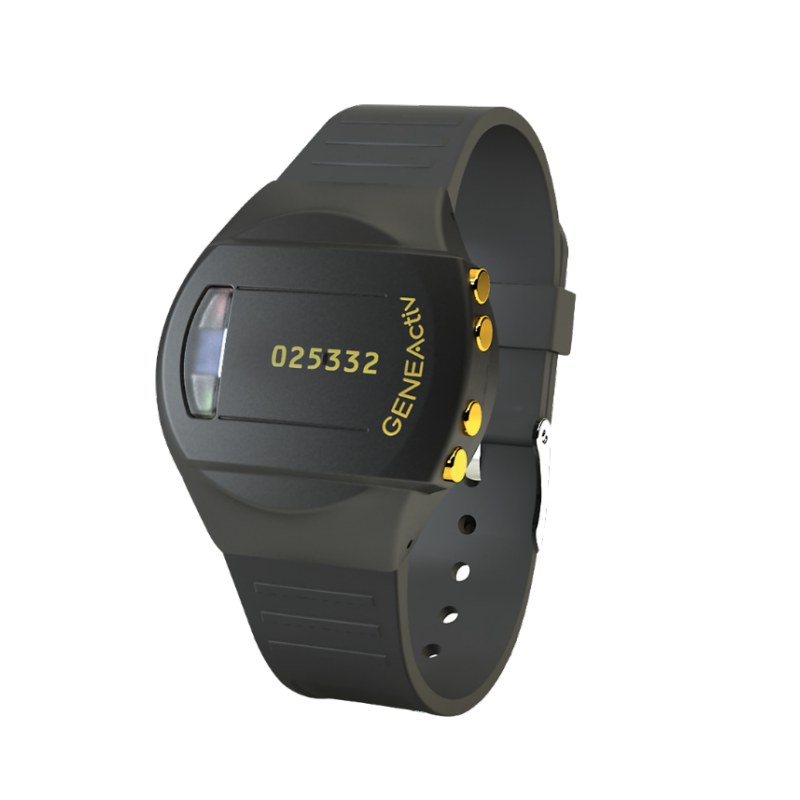
GENEActiv is a state-of-the-art, medical-grade raw data accelerometer designed to capture high-resolution, unfiltered data on physical activity, sleep, light exposure, and temperature. Trusted by researchers in over 1,500 peer-reviewed publications across 40 countries, GENEActiv enables the development of novel digital measures, machine learning algorithms, and in-depth behavioural analysis across a wide range of therapeutic areas.

Designed for long-term, continuous wear, the GENEActiv is lightweight, 100% waterproof, and built for 24/7 data collection in both clinical and free-living environments. Its unobtrusive form factor allows for comfortable use across multiple body locations, including the wrist, arm, or leg—capturing real-world evidence that reflects the lived experience of participants.

Validated in studies involving sleep, neurology (including Parkinson’s disease), dermatology (scratch research), cardiology, paediatrics, and more, GENEActiv is the digital health technology of choice for researchers aiming to monitor, measure, and understand human behaviour outside of traditional clinical settings.

Key Features:

  • Tri-axial raw accelerometry (10–100Hz sampling)
  • Continuous wear for up to 2 months with no charging
  • 100% waterproof, medical-grade housing
  • Ambient light and temperature sensors
  • Wearable on wrist, arm, leg, or other locations
  • Raw data formats (.bin, .AWD, .CSV) compatible with all major data platforms
  • Event marker button for timestamped recording
  • Seamlessly integrates with open-source tools (R, Python, Matlab)
  • TGA registered. 

Device Uses

The GENEActiv device is designed for use across a wide range of clinical and research applications, delivering high-quality, continuous data that supports objective insights into behaviour, physiology, and treatment outcomes. Its open-format raw data and flexible wearing options make it suitable for studies ranging from sleep and activity monitoring to complex machine learning research.

Common Applications Include:

Sleep Research and Clinical Assessment

  • Identification of sleep/wake cycles in free-living environments
  • Longitudinal monitoring of sleep patterns in clinical trials
  • Objective sleep scoring using the GENEActiv Sleep Toolkit or Actiware
  • Pre-screening tool before polysomnography (PSG). 

Physical Activity Monitoring

  • Quantification of movement intensity and sedentary behaviour
  • Measurement of energy expenditure and posture changes
  • Wearable across body sites for full-body motion analysis. 

Circadian Rhythm & Chronobiology

  • Analysis of activity and light exposure patterns over time
  • Studies in shift work, jet lag, seasonal affective disorder, and more
  • Ambient light tracking to assess external zeitgebers. 

Neurology and Movement Disorders

  • Monitoring of tremor, bradykinesia, and fine motor control
  • Commonly used in Parkinson’s disease, stroke, and neurodevelopmental disorder studies. 

Dermatology and Behavioural Studies

  • Scratch detection in eczema and pruritus research
  • Behavioural pattern recognition in paediatric and psychiatric populations.

Public Health and Epidemiology

  • Large-scale, free-living population monitoring
  • Data capture for machine learning models and predictive algorithms
  • Activity and sleep tracking in remote and under-resourced settings. 

With its scalable deployment, medical-grade design, and high patient adherence, GENEActiv continues to be a preferred solution for studies that require accurate, real-world behavioural and physiological data.

Software

Advanced, Open-Data Management for GENEActiv Devices

The GENEActiv platform empowers researchers and clinicians with full control over raw data and flexible analysis workflows. Its latest update to the Sleep Toolkit introduces automatic nap detection, enhanced temperature and 24-hour behavioural analytics, and AWD-format compatibility, enabling faster, richer insights from sleep and activity data. 

With open-format raw files (.bin) and broad compatibility across platforms, GENEActiv software integrates seamlessly with your preferred analysis tools, whether that’s R, Python, MATLAB or standard clinical workflows.

GENEActiv Software Tools:

GENEActiv PC Software

  • Extracts device recordings as raw .bin files and converts to .CSV or AWD epoch formats. 
  • Secure local data storage maintains full data sovereignty and supports offline workflows.
  • Compatible with standard analytical tools (R, MATLAB, Python) for custom pipelines and reproducible research.
  • Intuitive setup, device configuration, calibration and data export. 

GENEActiv Sleep Toolkit

    • Supports GENEActiv and legacy AWD files, enabling continuity with longstanding workflows. 
    • Supports manual scoring and diary integration alongside automated metrics such as:
      • Total Sleep Time (TST)
      • Sleep Onset Latency (SOL)
      • Sleep Efficiency (SE)
      • Wake After Sleep Onset (WASO)
    • Generates exportable, publication-ready reports for clinical or research applications.
    • ISO 27001-compliant environment for analysing and scoring sleep data.
    • Free to use for registered research/clinical users.

    Integration with R and Custom Pipelines

      • Full support for open-format data enables algorithm development, machine-learning workflows and custom digital-biomarker creation. 
      • Comprehensive training materials and SDKs support teams building reproducible workflows or advanced analytics.
      GENEACTIV EXTRACTION SOFTWARE

      Training

      Access the GENEActiv training materials here.

      GENEACTIV TRAINING MATERIALS

      Device Support Triage

      This document is designed to assist with the initial triage and troubleshooting of common GENEActiv issues. 

      DEVICE SUPPORT TRIAGE

      Marketing

      GENEACTIV MARKETING MATERIALS

      Warranty

      Please follow this link to access the warranty claim procedures documents

      Service Warranty Form

      The warranty period for all GENEActiv parts, charging station and strap is 1 year. 

      To make a warranty claim or send a device for service, complete the Service Form and follow the instructions on the form for next steps. If in doubt, contact your rep for troubleshooting.

      FAQs

      For Practitioners

      Once you have received your GENEActiv device(s), allow them to fully charge in the cradle for 3 hours before configuring with the software.

      This can be done via the USB port on your computer or using a USB wall plug. We recommend using a wall plug when charging your devices so that it does not interfere with the GENEActiv software. It is essential that the power supply provides 500mA on every port to ensure the devices fully charge.

      A red light on the device will indicate that the device is charging. After 3 hours, a green light will flash. This indicates that you can now connect the device to the software to ensure the battery is full and the device is ready for configuration. The LED lights are just visual indicators – it is essential to check the battery level in the GENEActiv PC software for a reliable reading. When fully charged, unplug, and remove from the cradle if not configuring straight away.

      It is important that GENEActiv devices are charged every 2 months for 3 hours to maintain good battery health, even when not in use. IMPORTANT: DO NOT leave GENEActiv devices on charge for longer than 3 hours at a time. Following a full 3 hour charge, the GENEActiv should have over 90% battery prior to deployment.

      For Participants

      Once you have received your device from your practitioner, you will not need to charge it. This will have already been done for you and the battery will last for the duration of the study.

      GENEActiv collects raw, unfiltered tri-axial acceleration data, along with ambient light and temperature readings. This data enables detailed analysis of physical activity, sleep/wake cycles, circadian rhythms, posture, sedentary behaviour, and more.

      Yes. The device is designed for continuous wear of up to two months without needing to be removed or recharged. This maximises participant compliance and data completeness in both clinical and free-living studies.

      Absolutely. GENEActiv data can be exported in open formats (.bin, .AWD, .CSV) and analysed using R, Matlab, Python, or any other statistical software. It is also compatible with Actiware and the GENEActiv Sleep Toolkit.

      Unlike traditional actigraphy devices that provide only pre-processed summary data, GENEActiv offers high-resolution, raw data, allowing researchers to apply custom algorithms, conduct machine learning analysis, and extract new insights as analytical techniques evolve. This makes the data future-proof and publication-ready across a wide range of applications.

      When a unit is placed in the cradle and it is charging correctly the red light will flash (for 3 hours). The LED light will flash red or green to indicate it is charging. Any other LED light activity or inactivity indicates that the unit is not correctly seated in the cradle and the unit should be removed and then replaced.

      Once the unit has been fully charged for 3 hours, the battery status should be checked by the software. It is then ready for immediate configuration and deployment. Otherwise, it should be removed from the cradle for storage.

      The battery life of GENEActiv is determined by the measurement frequency selected to record. For example, recording at 100Hz lasts for 7 days and 20Hz records for 30 days.

      It is important that GENEActiv devices are charged every 2 months for 3 hours to maintain good battery health, even when not in use.

      The charging cradle holds 4 GENEActiv units.

      Yes, the GENEActiv is fully waterproof up to 10m (IP – 1m for 24 hours). Users can therefore swim and shower whilst wearing the device. The device should be removed when entering a sauna, however.

      Yes, the device is safe to wear alongside other medical equipment. The GENEActiv does not contain magnets and will not interfere with other equipment, such as pacemakers and blood pressure monitors. You should however take the device off for an MRI scan.

      It is safe to take the GENEActiv through airport security and can be worn like a watch as normal. During the flight, it must be worn on the wrist or stored in carry-on luggage and not put in the hold.

      Once you have configured your device, if you put the unit back into the cradle once it has started recording, it will cease recording and its current data will be lost. You should only return the device back to the cradle once data collection is complete.

      The linear active thermister temperature sensor measures near-body temperature which is influenced by both the wearer and environment. The device has a range of 0 – 60 degrees Celsius, taking measurements a minimum of every 30 seconds.

      The data you get from GENEActiv is the raw data so you can apply any algorithm you like to the data.

      The GENEActiv is for everybody. GENEActiv has been deployed in many baby, child, adult, and elderly studies around the world. We also offer various adjustable straps which can be useful for different age groups and allow the device to be used in multiple body locations.

      Yes, the GENEActiv is widely validated by researchers across the globe. Please visit our publications section for more information.

      To clean the GENEActiv, wipe with a cloth or scrub with a soft bristle brush using warm soapy water or a mild detergent solution and allow to air dry. Alcohol wipes and mild sterilising solutions are also appropriate. 

      To disinfect the GENEActiv, use a Clinell Universal Wipe or equivalent product. Thoroughly cover and wipe the device so all surfaces are wetted. Ensure the device is allowed time to air dry completely before next use. Change the wipe if it becomes dry or soiled and dispose of it appropriately.

      If the GENEActiv is excessively soiled, we recommend removing the wrist strap to clean the parts separately. Should wrist straps become increasingly worn, additional straps can be purchased and easily replaced.

      The charging cradle can be cleaned with a dry cloth.

      The software may not recognise the device due to lack of charge, a poor connection or because the device has gone into reset mode.

      The GENEActiv includes protective circuitry which prevents it connecting to the GENEActiv PC Software if the battery is not sufficiently charged. This prevents data loss which could occur if the GENEActiv battery ran out of power during extraction. Ensure the GENEActiv is regularly charged to allow it to connect to the software on demand. Please see {Link to ‘how to charge my device’} for best practice on charging the GENEActiv. 

      The device may not be connecting due to one of the following three reasons:

      Insufficient Battery
      There is insufficient battery life in the device. This is prevalent in devices that have not been charged or used regularly and it may have gone into reset mode. Charging a device once may not be enough to take it out of reset mode. 

      Poor Connection
      The GENEActiv charges and connects to the software through the gold contacts on the device and the gold pins in the charging cradle. 

      • Ensure all 8 contacts and pins are clean and free from any residue. Please see our cleaning guidance here {Link to the cleaning FAQ above}.
      • Try removing and re-entering the device into the charging cradle. The device needs to be seated correctly and should clip into the charging cradle with an audible click.
      • Try a different position in the charging cradle as any damage or wear to the gold pins or clear plastic clips on the charging cradle may impair the connection.
      • Do NOT move or disturb the cradle whilst connected to the PC software or whilst charging.

      USB Error

      If neither the battery nor connection are the cause, the device may have seen a rare USB error. USB errors are often accompanied by a constant red light on the device. 

      There is a simple process that can be followed to take the device out of reset mode. This should not affect the data on the device and once out of reset mode, data should be available to download as normal.

      • Give the device(s) a full charge by placing it in the charging cradle for 3 hours (preferably via a USB wall plug).
      • Once complete, remove the device(s) from the charging cradle and set aside overnight (this is important).
      • The next day, give the device(s) a second full charge in the cradle for a further 3 hours.
      • The device should now be out of reset mode. It should now connect to the software as intended. You can check the battery status of the device via the GENEActiv software.
      • Once out of reset mode, you should complete a 7-day test by following the instructions below.

      Following a reset, how can I ensure my device is working correctly?

      After resetting your device(s), we recommend that you carry out a 7-day test to ensure your device is collecting data correctly.

      To do this, configure a fully charged GENEActiv to collect data at 100Hz for 7 days. 

      After 7 days of data has been collected, connect the GENEActiv to the software. Check that 90% of the memory has been used and that the device has an acceptable amount of battery left. We would normally expect devices to have around 40% battery remaining after a 7-day test (this may vary depending on the age of the device). 

      If both the battery and memory are working as expected, you can then reconfigure your device to be used again in the field.

      After resetting your device(s), we recommend that you carry out a 7-day test to ensure your device is collecting data correctly.

      To do this, configure a fully charged GENEActiv to collect data at 100Hz for 7 days.

      After 7 days of data has been collected, connect the GENEActiv to the software. Check that 90% of the memory has been used and that the device has an acceptable amount of battery left. We would normally expect devices to have around 40% battery remaining after a 7-day test (this may vary depending on the age of the device).

      If both the battery and memory are working as expected, you can then reconfigure your device to be used again in the field.

      The GENEActiv PC software is open source. It allows you to set up the device and extract raw data as a .bin file. The software offers capabilities to convert this into .csv compressed epoch files, which are readable in Excel. The raw data .bin files and .csv epoch files provide endless further analysis opportunities using analysis packages you are familiar with such as R and Matlab.

      The GeneActiv files, once extracted, can be converted to AWD files and then imported into Philips Actiware software for analysis.
      Here are instructions on how to convert and import the file 

      You no longer need a licence for this software.  Please see this link to download the last version. 

      ​Folder icon Actiware 6_3_0_Installation Files

      *Please note that you need to create the patient in Actiware before importing the files. 

      The download can take up to 20 minutes for 4 units with full data collection.

      If you are having installation problems, follow the troubleshooting steps below:

      • Download latest version of the GENEActiv software and drivers from our website and save them to your Desktop.
      • Extract the folders to your Desktop and install the software
      • Connect the cradle via the USB port
      • Insert device into cradle
      • Navigate to Drivers folder
      • Double left click ‘install.bat’.

      If the device still does not appear in software, it is likely that the drivers have not installed correctly. If this is the case:

      • Open Device Manager on your computer
      • Find the GENEActiv device, which should be listed as Geneactiv_01
      • Right click the device and select ‘Update Drivers’
      • Point the installation dialog to the drivers folder on the desktop
      • Drivers should then install
      • Device manager should now list the device as GENEActiv V1.1
      • The device should now appear in the software.
      First check: 
      1. If this is the first time you are using the devices, check that they have been charged every 6 months when not in use, to ensure good battery health. GENEActiv can sometimes get into a cycle where the electronics shut down due to low power, they then power up on charging, which drains the battery and then they will turn off before the end of the data collection period, this then repeats over and over.
        OR
      2. Have these devices been overcharged, over 3 hours and especially left on the cradle to continuously charge? This will damage the battery.
      Can you please follow these steps to ‘re-boot’ the battery or remove device from ‘re-set’ mode:
      1. Place the GENEActivs on an uninterrupted charge for full 3 hours.
      2. Take the GENEActivs off charge overnight (this is a key step).
      3. Place the GENEActivs back on charge for another full 3 hours.
      4. Please ensure the GENEActivs contact pins are clean and made a good connection with the pins in the cradle. It is recommended plugging the charging cradles into a power socket on the wall as opposed to a PC/laptop. If using splitters to power multiple cradles please ensure each cradle can pull 500mA of current.
      5. This process should remove any device from ‘re-set’ mode and give the battery enough power to charge and connect to the PC software properly. If battery status is not 90-100% it may be worth giving them a 3rd charge. Battery status can be seen when connected to the GENEActiv PC software.

      Research

      ActivInsights’ long-standing experience in remote monitoring has seen our technology validated in over 1,500 peer-reviewed scientific papers across a wide range of therapeutic areas.

      The device is widely tested with a total of 1500 publications and 200 clinical trials across 25 therapeutic areas.

      Investigating associations between physical activity, stress experience, and affective wellbeing during an examination period using experience sampling and accelerometry.

      The effect of sex and protein supplementation on bone metabolism during a 36-h military field exercise in energy deficit.

      Physical activity levels and cardiometabolic markers in individuals with newly diagnosed type 2 diabetes: a baseline analysis of the motivate t2d randomized controlled trial.

      Data-driven modelling approach to circadian temperature rhythm profiles in free-living conditions.

      Comparing GENEActiv against Actiwatch-2 over Seven Nights Using a Common Sleep Scoring Algorithm and Device-Specific Wake Thresholds. 

      Device agnostic sleep-wake segment classification from wrist-worn accelerometry. 

      Intervention to improve quality of sleep of palliative patient carers in the community: protocol for a multicentre randomised controlled trial. 

      Calibration and Cross-validation of Accelerometry in Children and Adolescents with Cystic Fibrosis. 

      Prediction of 30-Day Readmission for COPD Patients Using Accelerometer-Based Activity Monitoring. 

      GENEACTIV RESEARCH
      Back to product resources